Ready To Scale To Paid Advertising? Get To The Top Of Google Search In The Sponsored Section
A step by step playbook that shows you exactly how to set up paid ad campaigns that put you in the sponsored spot in the local map pack. Requires Ad spend
Businesses
- Sponsored Your businessYou ★★★★★0.6 miOpen WebsiteDirections
- 1Apex Plumbing Solutions ★★★★★0.4 miOpen
- 2Urban Pipeworks ★★★★★0.9 miOpen
- 3Metro Rooter & Plumbing ★★★★★1.2 mi
Illustration. The sponsored listing sits at the top of the local results, above the business ranked first. Not a client result.
Google Ads Puts You At The Top Of The Search.Your Google Business Profile
In Front Of People Searching Right Now.
Someone typing your service into Google is not browsing.
They have a problem, they want it handled, and they are choosing a business in the next few minutes.
Paid ads get you in front of them as soon as your campaigns are live.
Target Higher Intent Leads/Buyers
People searching for your service, seeing your Google Business Profile at the top, clicking it, and calling it.
That’s high intent. That’s what you’ll get by running ads.
Quick Results
If done correctly, you’ll get to the top quicker than traditional local SEO and your phone will be ringing.
We’ll show you step by step how to achieve this.
Scale Up & Down As Needed
We’ll show you how you can scale your campaigns to fit your business needs.
Stay within your budget and get the most results possible.
Track Results
We will show you how to understand exactly how much each call costs.
Understand how much is going out and how much is going back in your pockets every month.
Not Sure Where Or How To Start.Mistakes Can Cost A Lot Of Money.
Tried paid advertising before and did not get the results you were looking for.
Unsure how to even start building campaigns on Google.
Not clear where your money is going when running paid advertising.
Ads getting rejected by Google.
You need more phone calls. We understand.
That’s why everything we show is taken straight from campaigns that are doing just that in your industry.
A Step-By-Step Playbook Tailored For Your IndustryCampaign Setups That Make Your Phone Ring
Exact campaign setups from real campaigns that are producing real results.
We will show you what to click, what to type, what to leave alone, in the order you do it, and how to manage it.
You are not learning Google Ads. You are following a setup that already works.
The Process
Every step tells you what to do, where to click, and what it should look like when it is right.
The settings that decide whether you get calls or burn cash are already chosen. You are copying a configuration, not designing one.
Your progress saves to your account, so you can pick up right where you left off.
- Know the rules before you spend a dollar
- Set up your Google Ads account
- Build your campaigns
- Launch and handle Google’s review
- Know if it is working
What’s Inside.
What to do. Where to click. What good looks like. And why it matters, so you are not following instructions blind.
No theory, no jargon, and nothing that assumes you have done this before.
Add negative keywords
Add your negative keyword list to the campaign, not to a single ad group, so it covers every ad group underneath it.
Campaigns, then Audiences, keywords and content, then Keywords, then the Negative keywords tab.
The Level column reads Campaign on every row you added, and the searches that were never going to call you stop showing your ad.
What It Costs To Get The Phone To Ring.
Clicks and impressions do not pay your rent. Two real campaigns, one month each. The tracked phone calls they produced, and roughly what every call cost in ad spend.
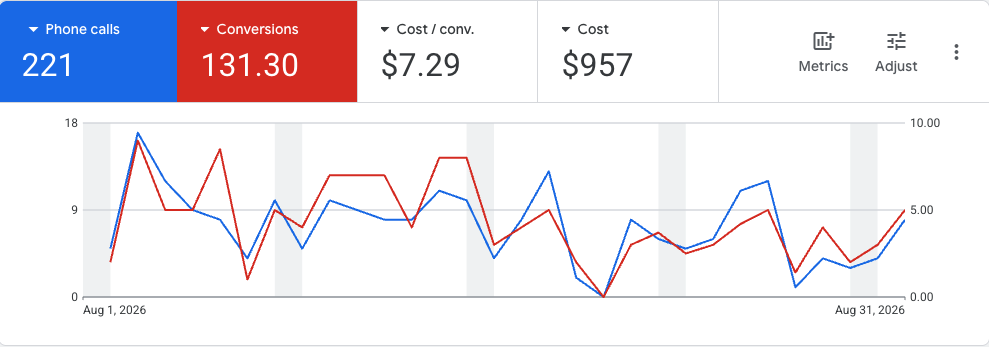
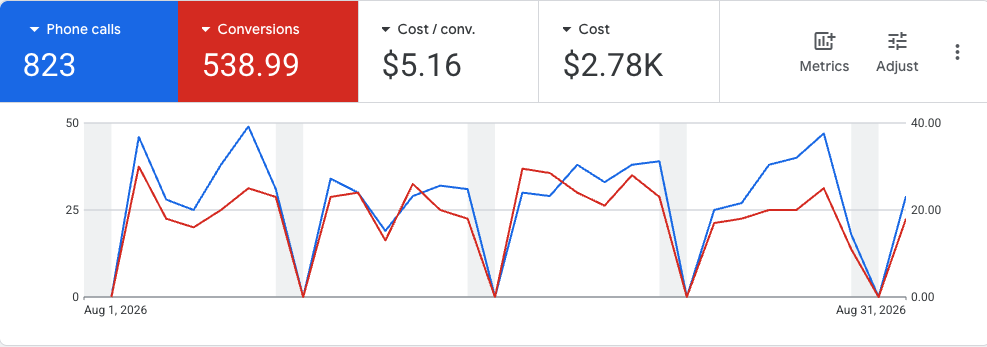
Two real Google Ads campaigns built with this playbook, in electronics repair, both August 2026. 221 phone calls from $957 in ad spend, about $4.33 per call. 823 phone calls from $2,780, about $3.38 per call. Conversions is Google’s own attributed count, which is why it carries a decimal and reads lower than the raw call count. Client identities removed. Past performance does not guarantee future results.
See the full proof libraryGoogle Ads Gets You Calls Now. The Rest Keeps Them Coming.
One price covers all of it. You do not pick pieces, and we do not sell them separately.
The same spot, without the click cost. Slower to earn, and it does not switch off when the budget does.
See the playbook Review ManagementYour ad gets them to look. Your reviews decide whether they call you or the shop underneath you.
See how it works Content Creation & ManagementAn active, professional profile is what they check right after they click.
See how it works Social AlertsCatches the customers who ask a local group instead of searching Google at all.
See how it works